3. Context and scope
Ar42 specifications helper
Contents
System scope and context - as the name suggests - delimits your system (i.e. your scope) from all its communication partners (neighboring systems and users, i.e. the context of your system). It thereby specifies the external interfaces.
If necessary, differentiate the business context (domain specific inputs and outputs) from the technical context (channels, protocols, hardware).
Motivation
The domain interfaces and technical interfaces to communication partners are among your system’s most critical aspects. Make sure that you completely understand them.
Form
Various options:
- Context diagrams
- Lists of communication partners and their interfaces.
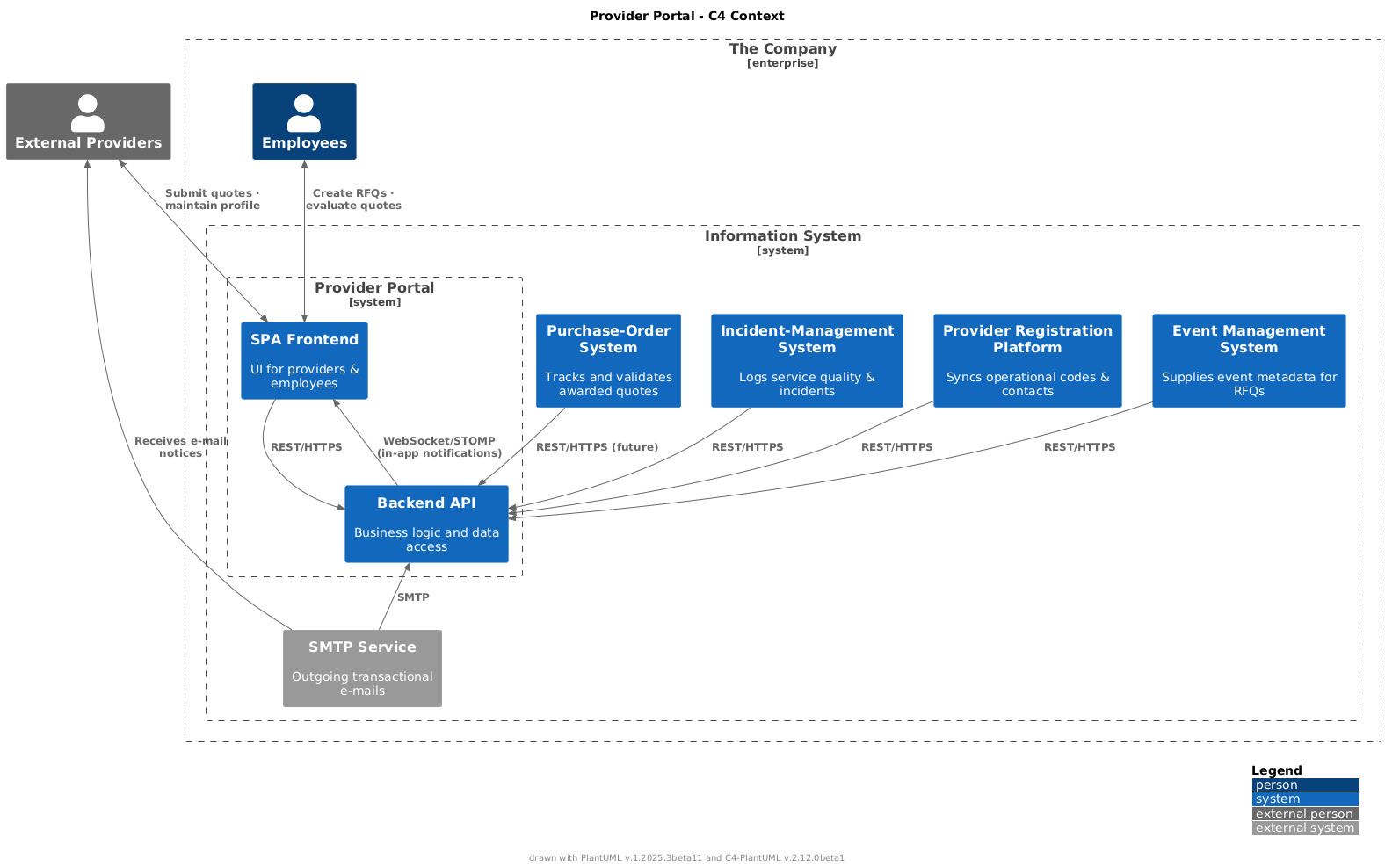
3.1 Business context
Ar42 specifications helper
Contents
Specification of all communication partners (users, IT-systems, …) with explanations of domain specific inputs and outputs or interfaces. Optionally you can add domain specific formats or communication protocols.
Motivation
All stakeholders should understand which data are exchanged with the environment of the system.
Form
All kinds of diagrams that show the system as a black box and specify the domain interfaces to communication partners.
Alternatively (or additionally) you can use a table. The title of the table is the name of your system, the three columns contain the name of the communication partner, the inputs, and the outputs.
| Communication partner | Input to Provider Portal | Output from Provider Portal | Main business purpose | In/Out Scope |
|---|---|---|---|---|
| External Providers | • Quote (price, availability) • Profile updates (fleet, contacts) In-app notification (real-time) | • RFQ (requirements, SLA) • Award / rejection notification | Enable competitive quoting and up-to-date supplier data | In |
| Employees | • New RFQ (+event needs) • Evaluation scores In-app notification when quotes arrive or RFQ status changes | • Short-listed providers • Final award decision • Evaluation dashboards | Plan events, compare offers, monitor quality | In |
| Purchase-Order System | • Purchase-order reference & status (future) | — | Formalise orders in financial system | Out |
| Incident-Management System | • Incident reports & severity | — | Feed quality scoring for suppliers | Out |
| Provider Registration Platform | Provider registration operational | • Canonical provider data set | Keep contact & operational codes in sync | Out |
| Event Management System | • Event metadata (location, date, lead time) | Re-use event information inside RFQ | Out | |
| SMTP Service | — | • Transactional e-mails (RFQ issued, quote received, award...) | Notify users and suppliers | In |
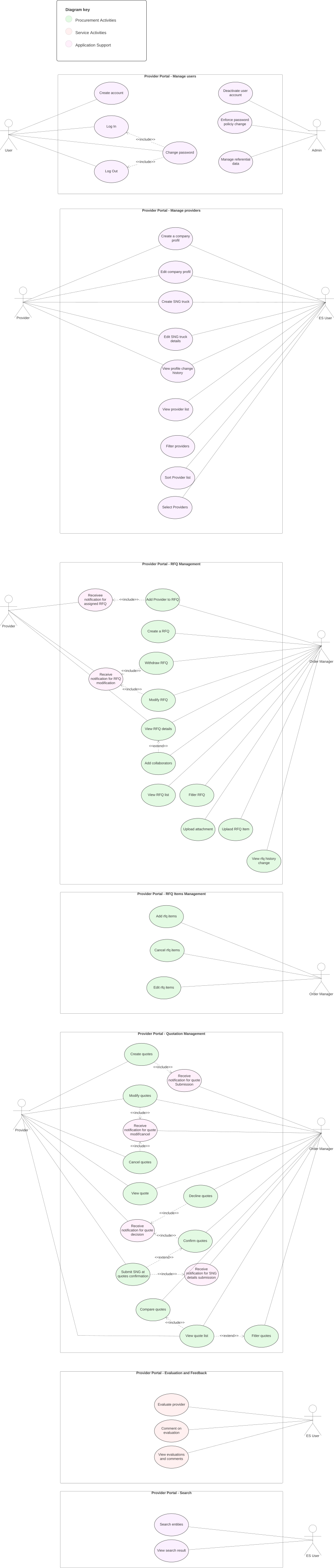
3.1.1 Uses Cases
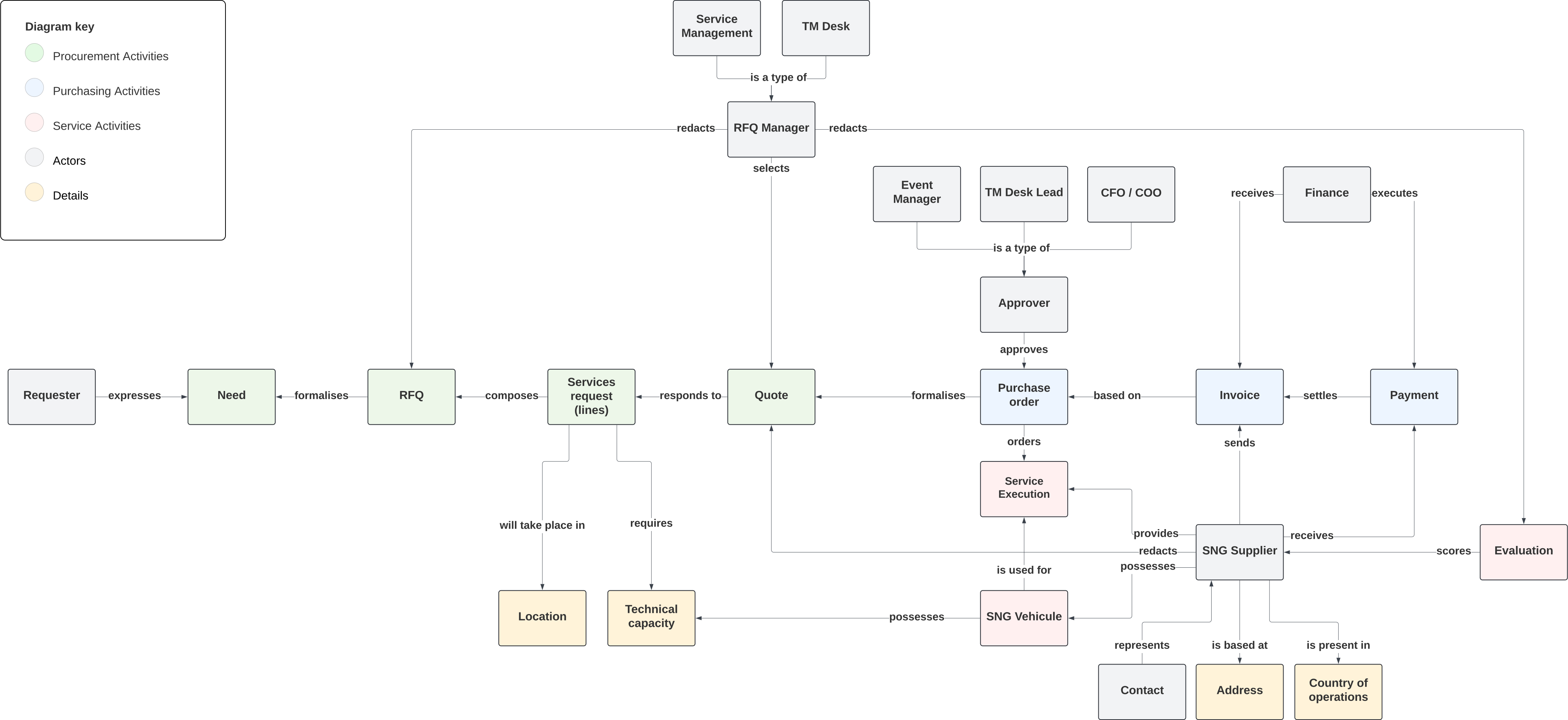
3.1.2 Conceptual model
3.2 Technical context
Ar42 specifications helper
Contents
Technical interfaces (channels and transmission media) linking your system to its environment. In addition a mapping of domain specific input/output to the channels, i.e. an explanation with I/O uses which channel.
Motivation
Many stakeholders make architectural decision based on the technical interfaces between the system and its context. Especially infrastructure or hardware designers decide these technical interfaces.
Form
E.g. UML deployment diagram describing channels to neighboring systems, together with a mapping table showing the relationships between channels and input/output.
| Channel / Protocol | Source → Target | Domain I/O transported | Security & QoS |
|---|---|---|---|
| HTTPS / REST v1 | Browser SPA → Backend | JSON API (OpenAPI 3.1), CRUD RFQ, quote upload, evaluation data | JWT, < 1 s p95 |
| WSS (WebSocket) / STOMP | Backend → Browser SPA | Real-time notification message (JSON) | JWT in CONNECT frame, server heartbeat 10 s |
| HTTPS / REST v1 | Backend ↔ POS / IMS / PRP / EMS | JSON API (OpenAPI 3.1) | _ |
| SMTP (TLS) | Backend → SMTP Service → Recipients | RFC-822 e-mails | _ |
| JDBC | Backend ↔ MySQL 8 | Relational data | Encrypted connection, pooled (Hikari) |
| TCP/SSH | DevOps laptop → VPS | Deployment artefact | Key-based |
| Domain I/O | Channel |
|---|---|
| In-app notification | WSS / STOMP |
| Quote, RFQ, Evaluation, Trucks | HTTPS / REST |
| E-mail notice | SMTP |
| Provider master data | REST |